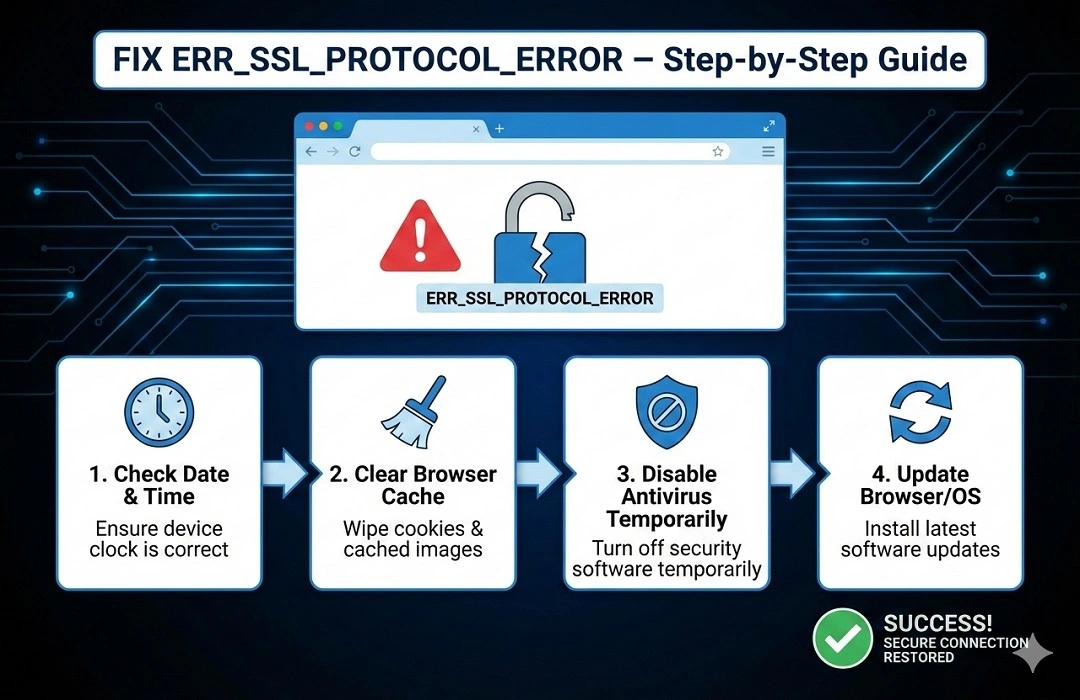
How to Fix ERR_SSL_PROTOCOL_ERROR –Step-by-Step Guide
In case your site displays ERR_SSL_PROTOCOL_ERROR, it indicates that it is not accessible in a secure manner anymore. Such an occurrence renders the visitors completely cut off from your site, and the latest browsers, including Google Chrome, Edge, and Firefox, will not allow the page to be accessed in order to protect the users. Consequently, your possible clients leave right away, your bounce rate goes up, and Google might begin to reduce the ranking of your website. Just this one mistake can significantly affect your online business, decrease sales, and ruin your brand’s trust among customers.
A secure website is absolutely essential for any business that relies on online visibility, such as e-commerce stores, service websites, or corporate portals. Customers will perceive your site as unsafe if it displays SSL errors, and consequently, they will not submit forms, make payments, or contact you. Therefore, resolving ERR_SSL_PROTOCOL_ERROR is not merely a technical job; rather, it is a business necessity.
At Webquick India, a trusted website development and website designing Delhi company, we help businesses solve SSL and website security issues every day. Our team has years of experience in building, managing, and securing business websites across different industries. We understand how SSL, HTTPS, servers, and browsers work together, and we know how to fix errors in the fastest and safest way.
What is ERR_SSL_PROTOCOL_ERROR?
If a user visits your website, the first thing the browser does is to try to establish a secure HTTPS connection. This connection is secured with SSL (Secure Sockets Layer) or TLS.
In case the browser and the website fail to establish the secure connection, the following error is displayed:
ERR_SSL_PROTOCOL_ERROR
To put it simply:
- Your website fails to provide proof of its security.
Thus, the browser prevents access to your website for user protection purposes.
Why This Error is Very Dangerous
In the event of this error showing up, the problem will be as follows:
- People visiting your website will not be able to access it
- Your website will lose its position on Google
- Google Ads will cease to operate
- Transactions over the internet will be unsuccessful
- Trust of customers will be decreased
- There will be a decline in both leads and sales
Such a scenario is the reason that web development services and secure website development are so critical in 2026.
Main Causes of ERR_SSL_PROTOCOL_ERROR
This error happens due to:
- SSL certificate expired
- SSL certificate missing
- SSL installed wrongly
- Website not fully HTTPS
- Mixed content (HTTP inside HTTPS)
- Old browser or TLS version
- Wrong date & time
- Antivirus blocking SSL
- DNS or hosting misconfiguration
- Broken certificate chain
These problems usually occur on websites that are not maintained by expert website designing Delhi teams.
How to Fix ERR_SSL_PROTOCOL_ERROR (Step-by-Step)
Step 1 – Check SSL Status
Just take it easy and visit your website
- Then click on the little padlock icon found in the address bar
- In case it is showing Not Secure, then it means SSL is not working.
Another option is to check the SSL status with the help of some online checkers.
Step 2 – Install or Renew SSL Certificate
Here you can login to your hosting account.
- Then you must check the Security
- SSL section to install
- Renew the SSL certificate.
- Many hosts give out free SSL certs.
- Allow a 10–30-min activation buffer.
Step 3 – Force HTTPS
Your website must use:
https://yourwebsite.com
In WordPress:
- Settings → General
- Update both URLs to HTTPS
This is a basic rule of modern website development.
Step 4 – Remove Mixed Content
If your HTTPS site loads any file from HTTP, SSL breaks.
Fix using:
- Really Simple SSL plugin
- Mixed Content Checker tools
Step 5 – Clear Browser & SSL Cache
Clear:
- Browser cache
- SSL state
Restart browser and test again.
Step 6 – Check System Date & Time
Wrong date or time breaks SSL verification.
Correct it and reload website.
Step 7 – Update TLS Version
Your server must support:
- TLS 1.2
- TLS 1.3
Hosting support or web development service providers can fix this.
Step 8 - Antivirus & Firewall
Disable antivirus temporarily.
If website opens for that, then move on and change the SSL settings.
Step 9 – Check Hosting Server
If nothing works, SSL chain or server config is broken.
Contact hosting or Webquick India.
Fixing ERR_SSL_PROTOCOL_ERROR Using Tools
Professional website development teams do not guess — they use tools.
Tool 1 – SSL Labs
This tool checks:
- Certificate validity
- TLS support
- SSL chain
If chain or TLS is wrong, SSL error appears.
Tool 2 – Why No Padlock
Shows:
- HTTP images
- Insecure scripts
- Mixed content
Replace them with HTTPS links.
Tool 3 – Chrome DevTools
Right-click → Inspect → Console
Reload site
Red errors show insecure resources.
Tool 4 – Cloudflare SSL
Set SSL mode to:
Full or Full (Strict)
Enable Always Use HTTPS
This fixes many SSL problems.
Tool 5 – WordPress SSL Plugins
Use:
- Really Simple SSL
- WP Force SSL
They:
- Force HTTPS
- Fix mixed content
- Solve SSL warnings
How SSL Errors Affect SEO & Business
Google prefers HTTPS websites.
If SSL is broken:
- Rankings drop
- Ads get rejected
- Trust decreases
- Conversions fall
Secure website development = better SEO + more sales.
How to Prevent SSL Errors in Future
- Enable auto-renew SSL
- Keep website updated
- Avoid HTTP links
- Use CDN
- Take professional website maintenance
Here is a more detailed, professional and conversion-focused version of your section:
Why Choose Webquick India
Webquick India is one of the best website designing Delhi and web development service companies which is trustworthy that facilitates companies in creating the secure, high-performance, and Google-approved websites. We do not simply create websites — we construct powerful digital arenas that enable businesses to grow online with assurance.
The proficient squad takes into account security, speed, SEO, and stability, and as a result, your website will be enjoying uninterrupted service from both users and search engines.
Our Key Services Include:
✔ SSL Installation & Renewal
We keep your site secure and customer data protected by installing, setting up, and renewing SSL certificates.
✔ HTTPS Migration
We convert your website from HTTP to HTTPS securely without traffic, SEO rankings, or functionality loss.
✔ Website Security & Error Fixing
We find and fix security weaknesses, malware infections, SSL errors, and technical issues that negatively impact trust and performance.
✔ Speed Optimization
We tweak your website to load faster on both desktop and mobile, thus providing a better user experience and higher Google rankings.
✔ SEO-Friendly Website Development
Our websites come with clean coding, mobile friendliness, proper structuring, and search-engine-friendly design, so they get better Google rankings.
With Webquick India, You Get a Website That Is
- Secure – Shielded by contemporary SSL, HTTPS, and security protocols
- Fast – Fine-tuned for instant loading and uninterrupted surfing
- Google-Trusted – Developed in compliance with Google’s SEO and security requirements
- Error-Free – No SSL alerts, faulty links, or technical problems
By opting for Webquick India, you get a trustworthy web development and web designing Delhi partner who makes your website secure, professional, and all set to expand your business online.
Final Words
ERR_SSL_PROTOCOL_ERROR can stop your entire online business. But with correct SSL setup and professional website development, it can be fixed easily.
If you want a secure, SEO-friendly and high-converting website, contact Webquick India – your trusted website designing Delhi & web development service partner
Frequently Asked Questions (FAQs)
1. What does ERR_SSL_PROTOCOL_ERROR mean?
ERR_SSL_PROTOCOL_ERROR indicates that your online browser is not able to establish a secure connection with the server of the site you are trying to access. This can occur due to the unavailability, expiration, or wrong configuration of the SSL certificate.
2. Is it a problem for my website if I get the ERR_SSL_PROTOCOL_ERROR message?
Certainly. This mistake prevents users from visiting your site and causes the loss of Google ranking, trust, potential customers and online payments.
3. ERR_SSL_PROTOCOL_ERROR can it hurt SEO?
Yes. Google is more inclined towards secure HTTPS sites. The breaking of SSL can lead to a drop in your SEO position and site visibility.
4. In what way can I find out if my SSL is properly functioning?
There are three ways you can do this:
- Aptly click on the lock symbol appearing on the browser
- Opt for SSL testing tools
- See if your site URL starts with HTTPS
5. Can I resolve ERR_SSL_PROTOCOL_ERROR problem all by myself?
Caches or mixed content are small issues that can be resolved easily, however, server-level SSL problems should be addressed by a professional website development or hosting service provider.
6. How long does it take to fix this error?
Most SSL errors can be fixed within a few hours if handled by a professional website designing Delhi team like Webquick India.
7. Can Cloud flare help fix this error?
Yes. By setting SSL mode to Full or Full (Strict) and enabling HTTPS redirection, Cloudflare can solve many SSL issues.
8. Why should I hire Webquick India to fix SSL issues?
Webquick India is a trusted website development and web development service company in Delhi. We provide SSL setup, HTTPS migration, security fixes, and SEO-friendly websites that work smoothly without errors.
 our blog

 Webquick
India
Webquick
India
 11 May 2026








 How It works